

Migrating a LangChain chatbot to Letta
This guide demonstrates how to migrate a LangChain chatbot to Letta. While the example is simple, it illustrates the core patterns needed for migrating larger, more complex applications, including replacing thread-based session management with persistent memory, converting stateless agents to stateful architecture, and eliminating manual state tracking.
You’ll learn how to replace LangChain’s MemorySaver with Letta’s memory blocks, eliminate thread ID management from your application, convert session-based state to persistent agent state, and apply these patterns to tools, RAG, and multi-agent systems.
Prerequisites
Section titled “Prerequisites”To follow along, you need:
- Python 3.10 or higher
- A Letta Cloud account with an API key
Create a Letta Cloud account
Section titled “Create a Letta Cloud account”Visit app.letta.com and sign up using a Google account, GitHub account, or email address.
Get your API key
Section titled “Get your API key”When you log in, you’re directed to the Letta dashboard:
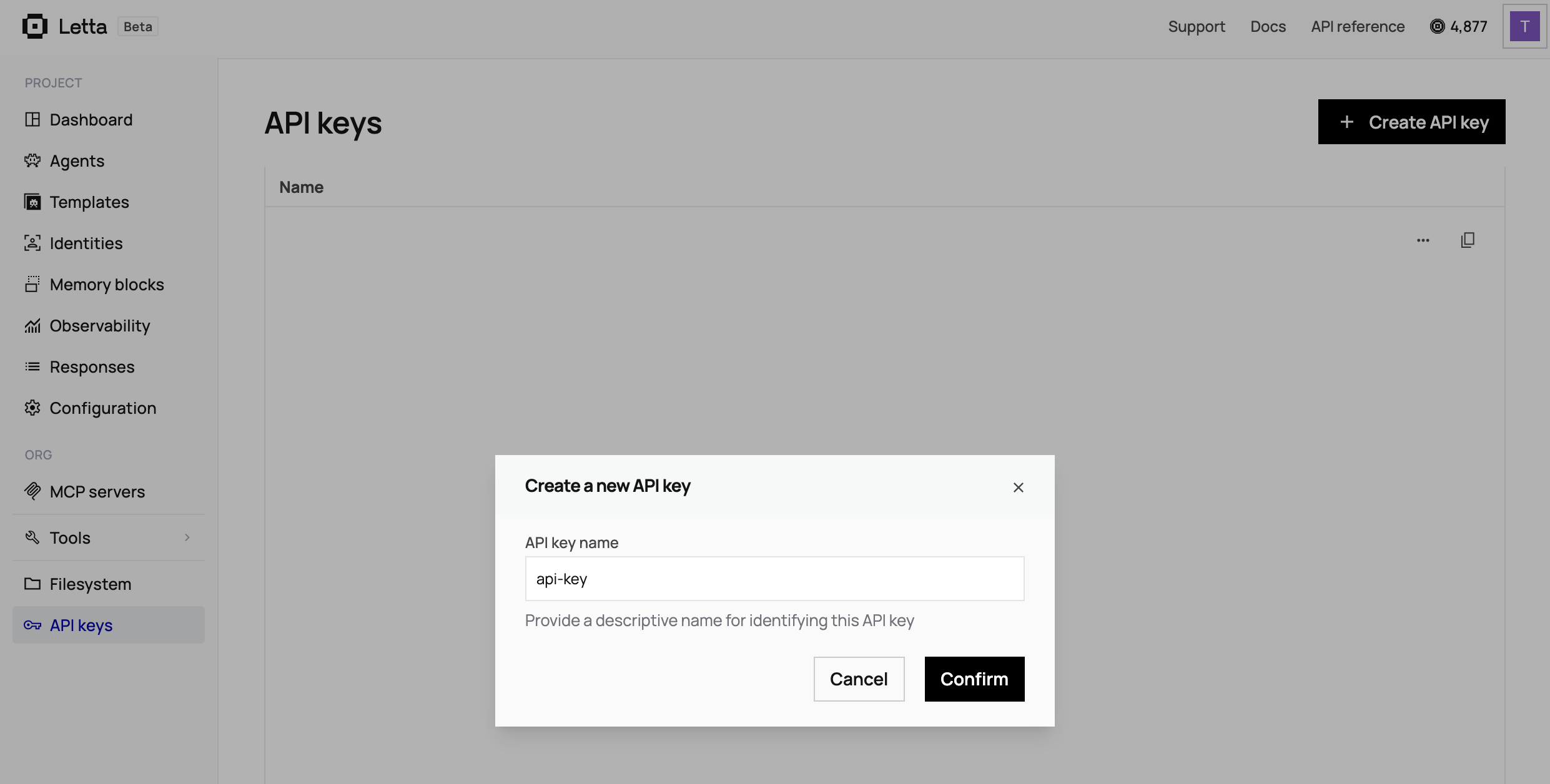
- Click your profile icon in the top right corner and select API Keys from the dropdown menu.
- Click + Create API Key.
- Copy the key and save it somewhere safe.
The example LangChain chatbot
Section titled “The example LangChain chatbot”We’ll start by building a simple LangChain chatbot that remembers conversation history using LangGraph’s MemorySaver.
Create the chatbot file
Create a new file called langchain_chatbot.py and add the following code to it:
from langchain_core.messages import HumanMessagefrom langchain.chat_models import init_chat_modelfrom langgraph.checkpoint.memory import MemorySaverfrom langgraph.graph import START, MessagesState, StateGraph
# Initialize the chat modelmodel = init_chat_model("gpt-4o-mini", model_provider="openai")
# Define the graph workflowworkflow = StateGraph(state_schema=MessagesState)
def call_model(state: MessagesState):    response = model.invoke(state["messages"])    return {"messages": [response]}
workflow.add_node("model", call_model)workflow.add_edge(START, "model")
# Add memory with MemorySavermemory = MemorySaver()app = workflow.compile(checkpointer=memory)
# Configuration with thread ID for this conversationconfig = {"configurable": {"thread_id": "user-123"}}
# First messageresponse = app.invoke(    {"messages": [HumanMessage(content="Hi, my name is Alice")]},    config=config)print(response["messages"][-1].content)
# Second message - same thread ID means it remembersresponse = app.invoke(    {"messages": [HumanMessage(content="What's my name?")]},    config=config)print(response["messages"][-1].content)
Install the required packages
Run the following command in your terminal:
pip install langchain-core langgraph langchain-openai langchainSet your OpenAI API key
Run the following command, replacing "your-api-key-here" with your OpenAI API key:
export OPENAI_API_KEY="your-api-key-here"Run the chatbot
Run this command to initiate the LangChain chatbot:
python langchain_chatbot.pyYou should see an output similar to the following:
Hello Alice! How can I help you today?Your name is Alice.The chatbot remembers Alice’s name because we used the same thread_id for both messages. If we’d changed the thread ID in the second message, the chatbot would have no memory of the first conversation.
LangChain migration patterns
Section titled “LangChain migration patterns”This simple example contains the core patterns you’ll encounter in all LangChain applications, regardless of whether they use tools, RAG, or multi-agent systems. Let’s break down the key components you need to replace.
Thread-based session management
Section titled “Thread-based session management”config = {"configurable": {"thread_id": "user-123"}}LangChain requires you to manually create, track, and pass thread IDs for every conversation. In production, this means database tables mapping users to thread IDs, cleanup jobs for abandoned threads, session affinity in load balancers, and the risk of using the wrong thread ID. This pattern repeats in every LangChain app: tools use the same thread config with every invocation, RAG systems tie retriever state to threads, and multi-agent systems require complex graph state management across threads.
In-memory state storage
Section titled “In-memory state storage”memory = MemorySaver()app = workflow.compile(checkpointer=memory)The MemorySaver keeps state only in your application’s memory. When the program stops, all conversations are lost. For production persistence, you’d need a PostgreSQL checkpointer setup, database schema migrations, a connection-pooling configuration, and manual state cleanup.
Graph workflow definition
Section titled “Graph workflow definition”workflow = StateGraph(state_schema=MessagesState)
def call_model(state: MessagesState): response = model.invoke(state["messages"]) return {"messages": [response]}
workflow.add_node("model", call_model)workflow.add_edge(START, "model")LangChain requires explicit workflow graph definitions even for simple linear flows. You define state schemas, create nodes for each step, and manually wire them together with edges.
Migrating to Letta’s persistent memory model eliminates all these patterns.
Migrating to Letta
Section titled “Migrating to Letta”Now we’ll convert the LangChain chatbot to a Letta chatbot step by step. We’ll create a new file for the Letta chatbot so you can compare both chatbots side by side.
Install Letta and initialize the client
First, install the Letta Python client:
pip install letta-clientCreate a new letta_chatbot.py file with code from the LangChain chatbot.
Replace LangChain library imports with the Letta platform client
LangChain is a library that runs inside your application’s process. Letta is a platform where agents run as a service, and your application makes HTTP requests to interact with those agents.
This means your application stays lightweight. In LangChain, your pods need memory for model inference, pod affinity rules for session continuity, and database connection pooling for state. In Letta, you just need an HTTP client. Agents run on the platform, so you don’t manage inference, state, or coordination.
Replace the LangChain imports:
from langchain_core.messages import HumanMessagefrom langchain.chat_models import init_chat_modelfrom langgraph.checkpoint.memory import MemorySaverfrom langgraph.graph import START, MessagesState, StateGraphWith the following Letta import:
from letta_client import LettaThen replace the entire workflow setup:
# Initialize the chat modelmodel = init_chat_model("gpt-4o-mini", model_provider="openai")
# Define the graph workflowworkflow = StateGraph(state_schema=MessagesState)
def call_model(state: MessagesState):    response = model.invoke(state["messages"])    return {"messages": [response]}
workflow.add_node("model", call_model)workflow.add_edge(START, "model")
With the Letta client initialization:
# Initialize Letta client with your API keyclient = Letta(api_key="your-letta-api-key-here")Notice how much simpler this is. Letta handles the model, workflow, and memory management on the server, so you don’t need to configure any of that locally.
Replace MemorySaver with memory blocks
LangChain’s MemorySaver stores conversation history implicitly as an in-memory message list. It disappears when your program stops.
Letta uses explicit memory blocks that define what the agent should remember. A human block stores what the agent learns about the person. The persona block defines how the agent sees itself. These persist automatically on Letta’s servers.
Remove the memory and thread config code:
memory = MemorySaver()app = workflow.compile(checkpointer=memory)
# Configuration with thread ID for this conversationconfig = {"configurable": {"thread_id": "user-123"}}
Add agent creation with memory blocks:
# Create an agent with memory blocksagent = client.agents.create(    model="openai/gpt-4o-mini",    embedding="openai/text-embedding-3-small",    memory_blocks=[        {            "label": "human",            "value": "I don't know the human's name yet."        },        {            "label": "persona",            "value": "I am a helpful assistant who remembers conversations."        }    ])
print(f"Created agent: {agent.id}")
Replace thread-based messaging with agent messaging
LangChain requires you to pass thread IDs with every request. You create thread IDs, store them in a database mapping users to threads, and pass a config dictionary with every call. Your load balancer needs session affinity rules to route users to the correct pod.
Letta uses agent IDs. Each user maps to an agent, and any pod can serve any request, because Letta maintains state on the platform. No config dictionary, thread management, or session affinity required.
Replace the LangChain message code:
# First messageresponse = app.invoke(    {"messages": [HumanMessage(content="Hi, my name is Alice")]},    config=config)print(response["messages"][-1].content)
# Second message - same thread ID means it remembersresponse = app.invoke(    {"messages": [HumanMessage(content="What's my name?")]},    config=config)print(response["messages"][-1].content)
With the Letta version:
# First messageresponse = client.agents.messages.create(    agent_id=agent.id,    messages=[        {            "role": "user",            "content": "Hi, my name is Alice"        }    ])
# Print the assistant's responsefor message in response.messages:    if message.message_type == "assistant_message":        print(message.content)
# Second message - agent remembers automaticallyresponse = client.agents.messages.create(    agent_id=agent.id,    messages=[        {            "role": "user",            "content": "What's my name?"        }    ])
# Print the assistant's responsefor message in response.messages:    if message.message_type == "assistant_message":        print(message.content)
The key difference is that this version has no config parameter or thread ID. Letta agents maintain their state automatically, so all you need is the agent ID.
The response also includes more detail than LangChain. Letta returns multiple message types, including reasoning (the agent’s internal thoughts), tool calls, and the final assistant message.
The complete Letta chatbot
Section titled “The complete Letta chatbot”Here’s the full letta_chatbot.py file after migration:
from letta_client import Letta
# Initialize Letta client with your API keyclient = Letta(api_key="your-letta-api-key-here")
# Create an agent with memory blocksagent = client.agents.create(    model="openai/gpt-4o-mini",    embedding="openai/text-embedding-3-small",    memory_blocks=[        {            "label": "human",            "value": "I don't know the human's name yet."        },        {            "label": "persona",            "value": "I am a helpful assistant who remembers conversations."        }    ])
print(f"Created agent: {agent.id}")
# First messageresponse = client.agents.messages.create(    agent_id=agent.id,    messages=[        {            "role": "user",            "content": "Hi, my name is Alice"        }    ])
# Print the assistant's responsefor message in response.messages:    if message.message_type == "assistant_message":        print(message.content)
# Second message - agent remembers automaticallyresponse = client.agents.messages.create(    agent_id=agent.id,    messages=[        {            "role": "user",            "content": "What's my name?"        }    ])
# Print the assistant's responsefor message in response.messages:    if message.message_type == "assistant_message":        print(message.content)
Set your Letta API key
export LETTA_API_KEY="your-letta-api-key-here"Alternatively, pass it directly in the code:
client = Letta(api_key="letta_xxxxx...")Run the migrated chatbot
python letta_chatbot.pyYou should see output similar to:
Created agent: agent-abc123...Hello Alice! Nice to meet you.Your name is Alice!View your Agent in the ADE
Section titled “View your Agent in the ADE”The Agent Development Environment (ADE) lets you see what your agent is thinking and what it remembers.
Visit app.letta.com and log in. Navigate to the Agents section on the dashboard, where your agent is listed:
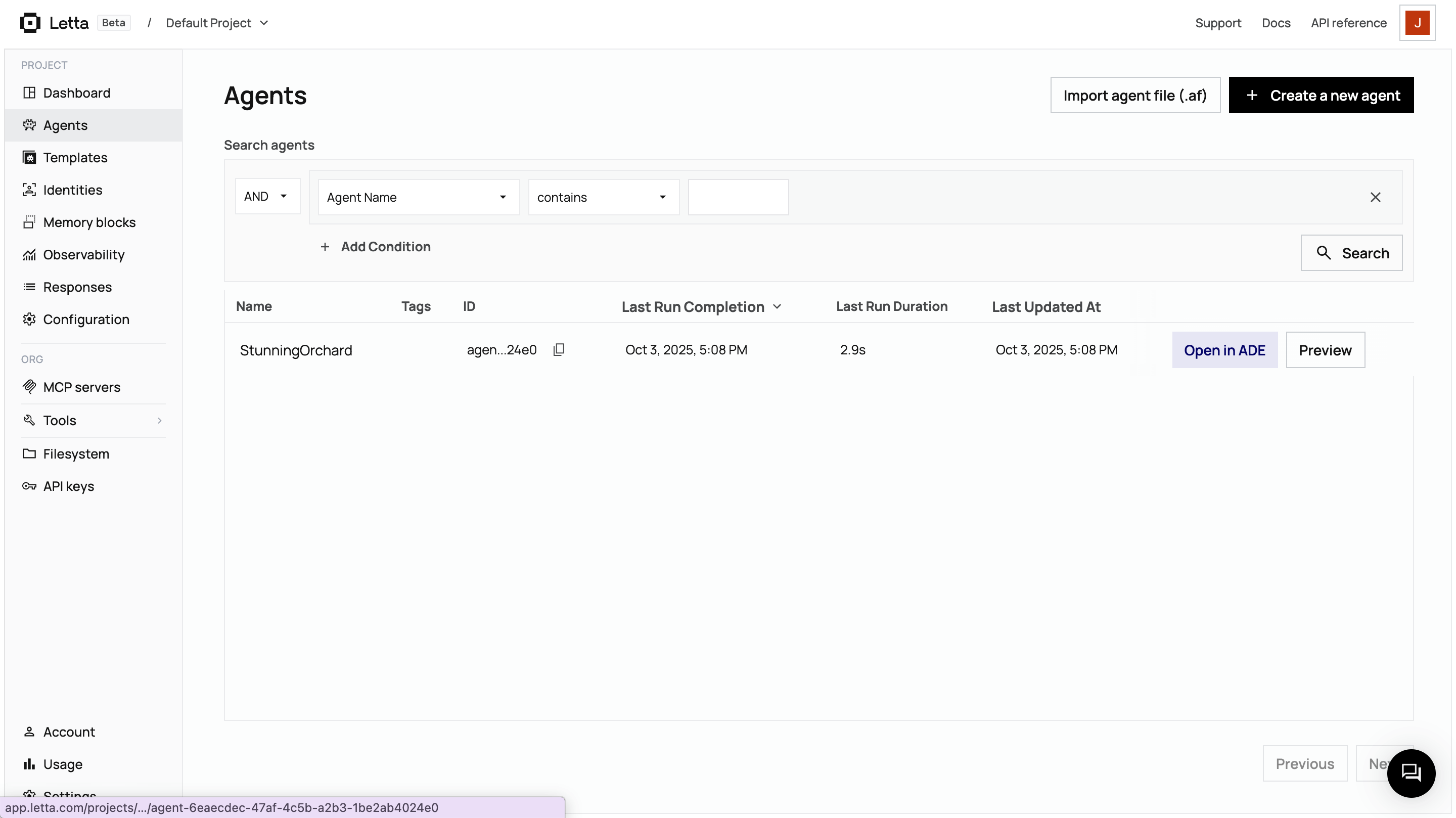
Click on your agent, then select Open in ADE:
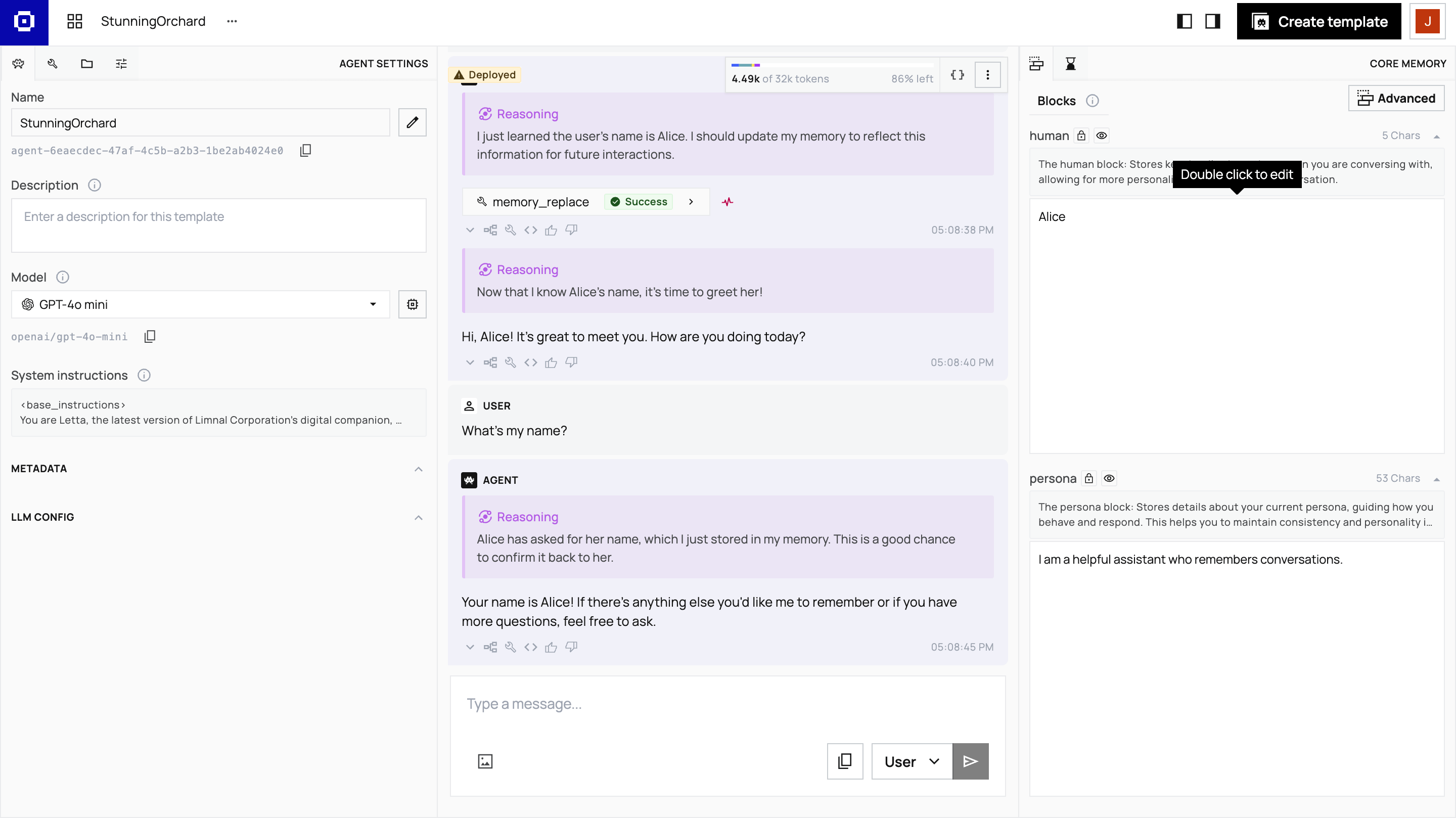
In the ADE, you can view:
- Memory blocks: The data the agent has stored in its
humanandpersonablocks - Message history: Every message exchanged with the agent
- Reasoning steps: The agent’s internal thoughts (chain-of-thought)
- Context window: What the agent sees when it processes messages
After the first message, the agent updates its memory block to remember Alice’s name. This happens automatically through Letta’s built-in memory management tools.
The ADE provides observability that would require custom tooling in LangChain. You can inspect memory to see exactly what the agent remembers, watch reasoning traces to understand the agent’s decision-making process, monitor tool calls to see which tools agents invoke and why, and view the context window to understand what’s stored in context versus archival memory.
What we eliminated in the migration
Section titled “What we eliminated in the migration”The LangChain version required workflow graph definition, state schema setup, MemorySaver configuration, and thread config management.
The Letta version accomplishes the same functionality with just agent creation and message sending.
More importantly, we avoided creating the infrastructure you’d need to build for a production LangChain app. Our simple LangChain example used in-memory MemorySaver, which loses all conversations when the program stops. A real application would need:
- A database setup for a PostgreSQL checkpointer
- Thread lifecycle management code for creating and tracking thread IDs per user
- Session cleanup jobs to remove abandoned threads
- State synchronization logic across your application servers
With Letta, none of this infrastructure exists because agents’ state automatically persists on the platform.
Apply these patterns to other applications
Section titled “Apply these patterns to other applications”Now that you understand the core migration patterns, you can approach migrating larger LangChain applications as follows:
- First, identify session and thread management code (like we removed here).
- Map state to memory blocks (like
humanandpersona). - Convert library calls to API calls (like we did with
client.agents.create). - Test that state persists across restarts.
If your app uses tools, the same pattern applies:
- Register tools with the Letta server.
- Attach to agents.
- Eliminate thread configs.
See the Custom Tools guide for more information.
If your app uses RAG (for example, vector stores or retrievers), approach migration as follows:
- Replace document loaders and vector stores with Letta’s filesystem.
- Upload files to folders.
- Attach to agents.
See the Letta Filesystem guide for more information.
If your app uses multi-agent systems (like LangGraph supervisors), replace graph coordination with shared memory blocks. See the Multi-Agent Shared Memory guide for more information.
Continue Learning
Section titled “Continue Learning”- Add custom tools to give your agent new capabilities.
- Learn about memory blocks and how agents edit their own memory.
- Build multi-agent systems with shared memory.
- Explore different agent architectures.